Added pio job-status for a quick view of running jobs.
Easier time syntax for experiment profiles!
Use the t field to specify times using suffixes, like 15s, 1m, 2.5h
In repeat blocks, every replaces repeat_every_hours, and max_time replaces max_hours. Both the same time syntax above.
In when blocks, wait_until replaces condition.
experiment_profile_name: demo_stirring_repeat

metadata:
  author: Cam Davidson-Pilon
  description: A simple profile that starts stirring, increases it every 5min, and stops when the RPM exceeds 2000.

common:
  jobs:
    stirring:
      actions:
        - type: start
          t: 0
        - type: repeat
          t: 5m
          every: 5m
          actions:
            - type: update
              t: 0.0s
              options:
                target_rpm: ${{::stirring:target_rpm + 100}}
        - type: when
          t: 0s
          wait_until: ${{::stirring:target_rpm > 2000}}
          actions:
             - type: stop
               t: 0s
This is now the preferred way (though the old syntax isn’t going away), and docs will be updated to reflect this.
Bug fixes
Cluster CLI commands now use click.Abort() (instead of bare sys.exit) so failed prompts, copy/install operations, and OD blanking exit cleanly with Click’s messaging.
Background jobs now only clear MQTT/db cache entries for attributes that were actually set, preventing accidental removal of unset metadata.
Dodging jobs keep their OD-reading interval topic published even if a second OD reader attempts to start and fails, so dodging continues uninterrupted.
Fix pios update ... breaking the web server from starting. (pio update is fine)
Fix blue LED not coming online when initializing a worker.
I am trying to update to 25.11.19 but i see that a need to be at least on 25.11.12 which needs to be done with “a full rewrite of your SD card” does that mean reinstall the image and on the leader and every single worker?
Interesting. Is this a step that we will all have to take on the way forward? Or is it just for those who want to switch to v1.5. Also will we have to do the same for v2.0?
Yes, to continue with software updates from us. It just happened to be timed concurrently with the v1.5 release. We don’t expect the v2.0 to have a similar requirement.
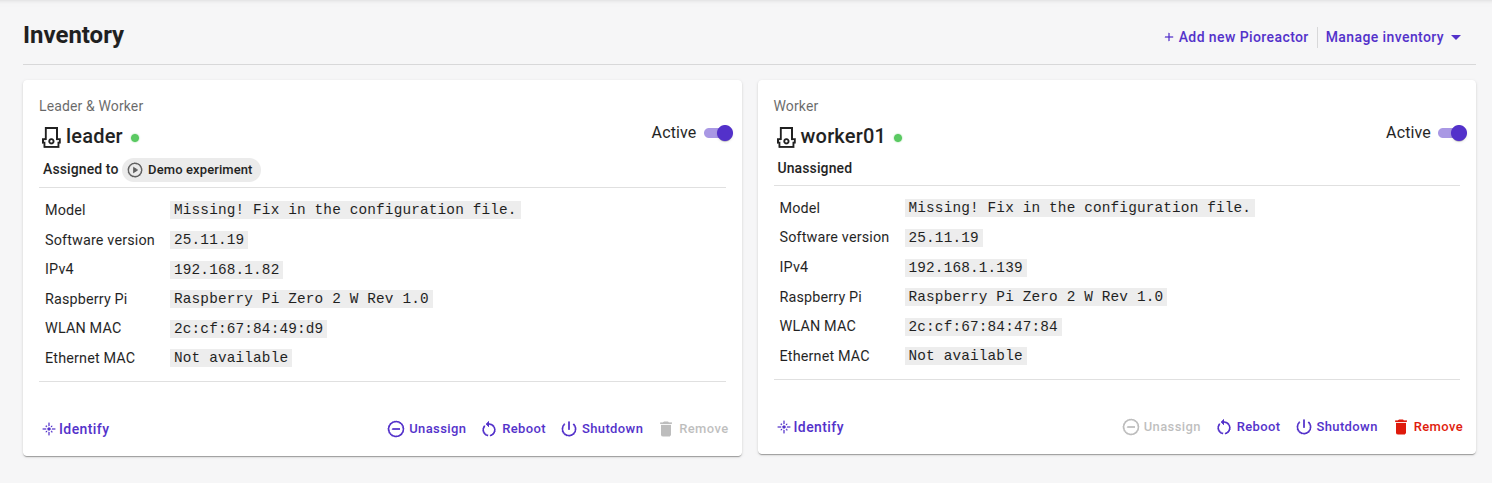
Hm, that’s weird - that line “Missing! …” is from an older software version. Also, the menu looks different in the 25.11.x version (remove, shutdown, etc. have moved to a menu).
Hm, did you happen to install a plugin on the leader, or is this a screenshot of brand-new build?
I used the new Pi Imager v2.0.0 process where you select the Pioreactor version from the new “content repository”, so it should be brand-new builds with nothing extra installed. FWIW, these are both 20ml Pioreactors, with v1.1 leader-worker and v1.0 worker.
 Download release here