I reimaged my pioreactor to the latest software release, however I can’t control it from the UI. I’m connecting via a static IP address over university network. Loading the UI works great, changing config works, and SSH works. However, when I go to inventory, there is a red indicator that says “Lost, something went wrong. Try power cycling the unit.” I’ve tried power cycling to no luck. Any advice?
Hi @rcphysics, have you changed the broker_address under [mqtt] in the configuration to the static IP you are using?
If you’re on the very very latest (26.2.23), you can SSH in and run a
pio status
to get more information
Hello,
I am experiencing the same issue. When I run pio status in PuTTY, everything appears to be fine. However, I’m unable to turn on the stirrer or control the temperature. In fact, my Activities section is blank, and I can’t see any of those functions.
I recently updated my Pioreactors, but when I checked in PuTTY, it seems the worker reactors were not updated and are still running the older version. I tried updating through puTTy , but it says access denied
Pioreactor leader-26.2.23, worker-26.2.3
Also, my OD measurements seem to be incorrect. Based on the logs, it looks like the system isn’t using the calibration at all. I checked the calibration settings, and the calibrations are marked as active. I am attaching picture of the log. (This happened when the pioreactor version was 26.2.3)

I am also not able to access the config.ini through UI.
Can you check a few log lines above - a message about calibations would show up just prior to your screenshot (either “No calibration available …” or “Using OD calibration …”)
I recently updated my Pioreactors, but when I checked in PuTTY, it seems the worker reactors were not updated and are still running the older version.
Can you try updating via the UI again? Applying the update over and over is generally a safe operation. When you do, check the System Logs (Under Inventory), and see if there are messages from the worker Pioreactors who are not updating).
However, I’m unable to turn on the stirrer or control the temperature. In fact, my Activities section is blank, and I can’t see any of those functions.
This is odd. Try a hard refresh in the UI. If that still fails, open up the javascript console and copy-paste the errors you see here.
I’ve attached the experiment log file here. Could you please check why I’m getting incorrect OD measurements?
log.csv (325.4 KB)
My Pioreactor UI is working now. I was able to update it through PuTTY using the command pio app update.
Do you always use pio update app - that is, updating over the internet and not release zip files?
There was an important change in 26.1.30 that may not have been applied in your cluster. On the Calibrations page, do you see under device values od, or od90?
I have attached the screenshots. I have also attached the calibration file, in case there is something wrong there.
calibration_yamls.zip (39.4 KB)
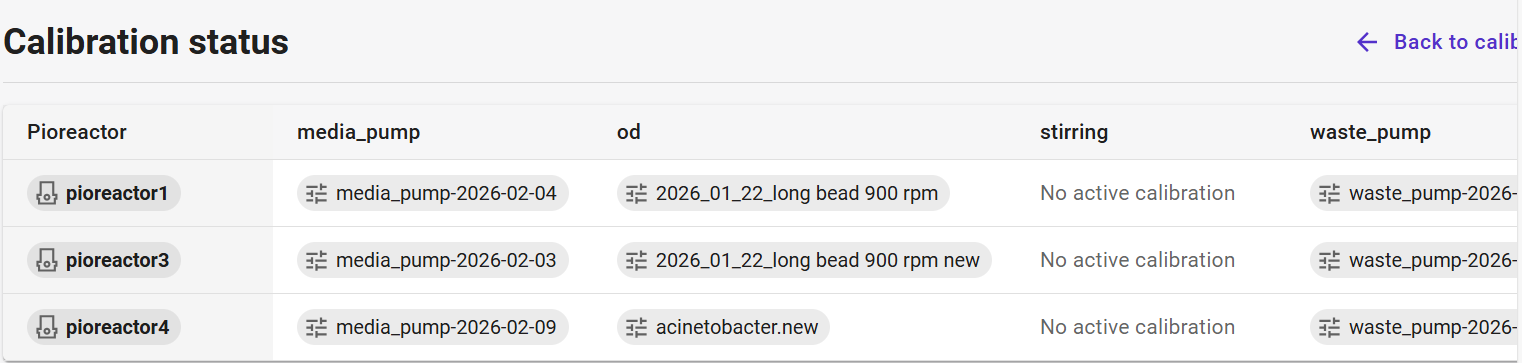
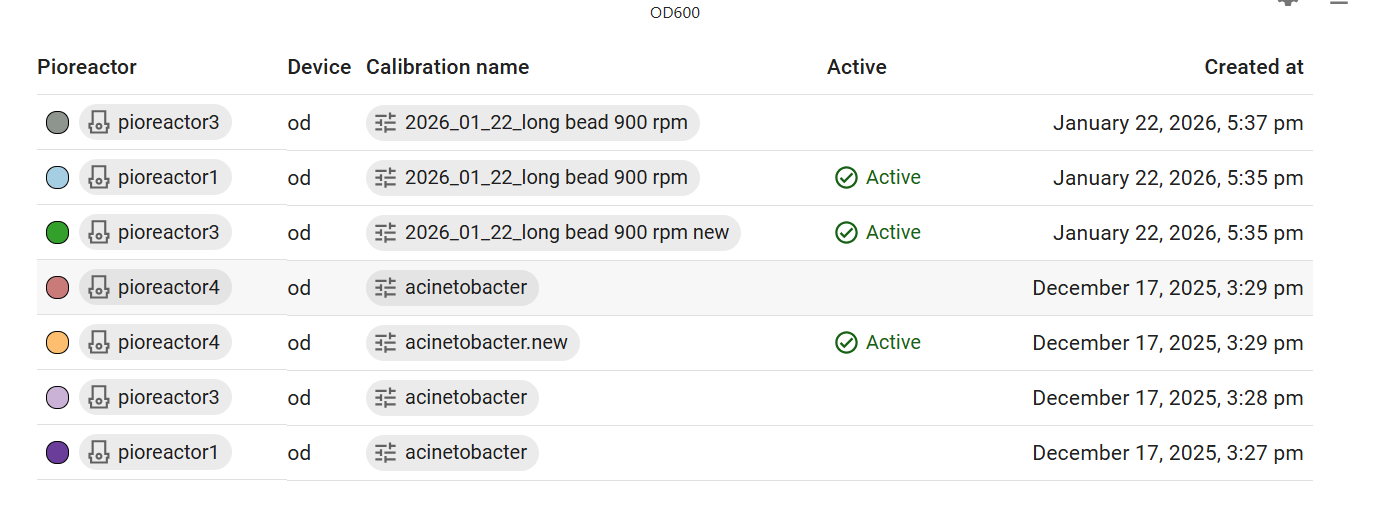
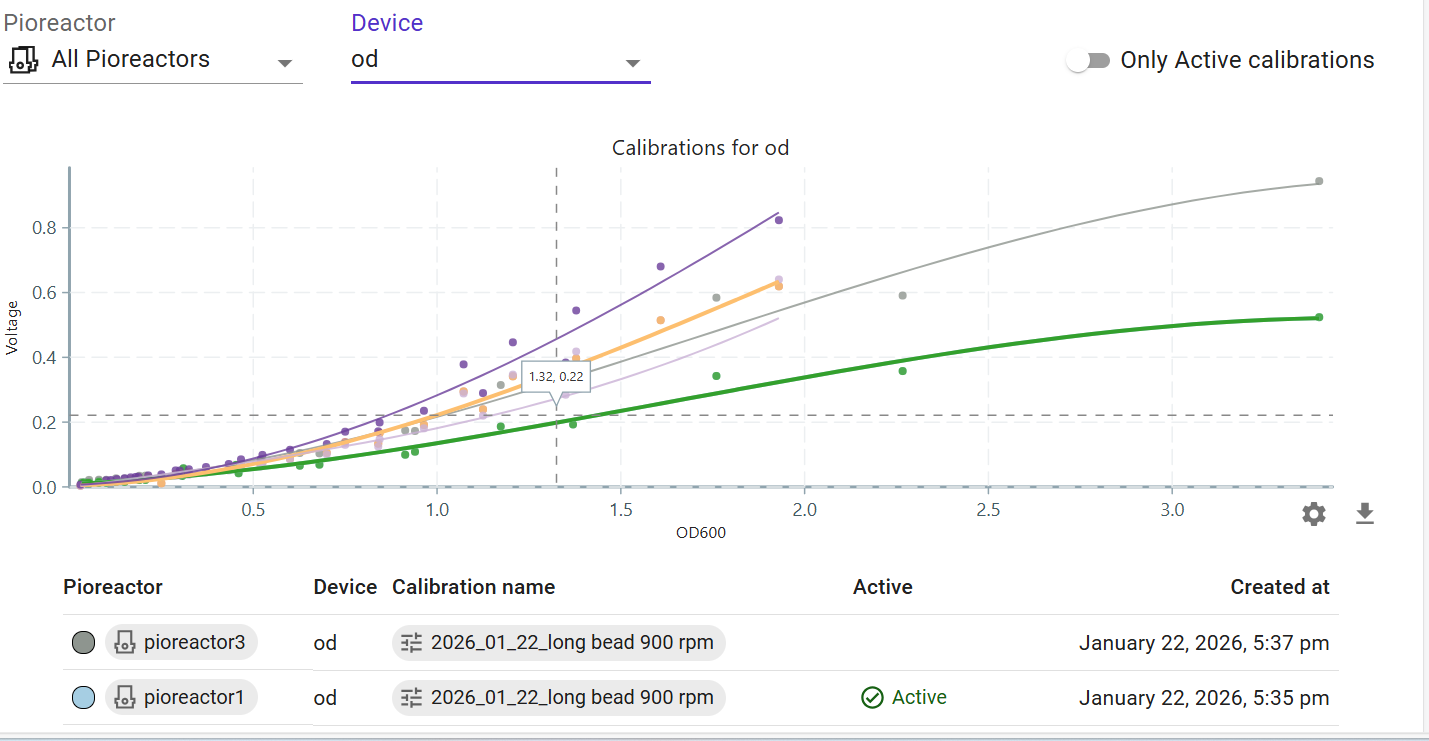
Right, okay, some important migration wasn’t applied in an update. From the changelog:
- OD calibration devices are now per-angle (
od45,od90,od135) instead of justod. Physically, this changes the calibration directory in~/.pioreactor/storage/calibrations/odto~/.pioreactor/storage/calibrations/{od45,od90,od135}. Existingodcalibration files and active calibrations are migrated during the update.
During the update to 26.1.30, a script bundled with the update should have been run your Pioreactors, but it did not.
Can you try downgrading your cluster to 26.1.30:
pios update app -v 26.1.30 -y
This will re-apply the patch to change od to od90.
(UI will not work, that’s okay, see below. If you need to see it, try sudo systemctl restart pioreactor-web.target on the leader)
then, after a few minutes, re-upgrade the cluster:
pios update app -v 26.2.23 -y
Also, I figured our why your UI wasn’t working. pio update app doesn’t restart the backend, so some (updated) UI API calls were out of sync in the backend . This isn’t obvious (even to me), but you should run
pio update app && sudo systemctl restart pioreactor-web.target
or pio update app and restart the machine.
(We fix all this in a future release)
1 Like
MQTT is set to the static IP. in shared config:
[mqtt]
username=username
password=password
broker_address=static ip
broker_ws_port=9001
broker_port=1883
ws_protocol=ws
use_tls=0
Here are the results of pio status.
Traceback (most recent call last):
  File "/opt/pioreactor/venv/lib/python3.13/site-packages/pioreactor/whoami.py",                                                                                   line 56, in _get_assigned_experiment_name
    result.raise_for_status()
    ~~~~~~~~~~~~~~~~~~~~~~~^^
  File "/opt/pioreactor/venv/lib/python3.13/site-packages/pioreactor/mureq.py",                                                                                   line 250, in raise_for_status
    raise HTTPErrorStatus(self.status_code)
pioreactor.mureq.HTTPErrorStatus: HTTP response returned error code 401

During handling of the above exception, another exception occurred:

Traceback (most recent call last):
  File "/opt/pioreactor/venv/bin/pio", line 6, in <module>
    sys.exit(pio())
             ~~~^^
  File "/opt/pioreactor/venv/lib/python3.13/site-packages/click/core.py", line 1                                                                                  157, in __call__
    return self.main(*args, **kwargs)
           ~~~~~~~~~^^^^^^^^^^^^^^^^^
  File "/opt/pioreactor/venv/lib/python3.13/site-packages/click/core.py", line 1                                                                                  078, in main
    rv = self.invoke(ctx)
  File "/opt/pioreactor/venv/lib/python3.13/site-packages/click/core.py", line 1                                                                                  688, in invoke
    return _process_result(sub_ctx.command.invoke(sub_ctx))
                           ~~~~~~~~~~~~~~~~~~~~~~^^^^^^^^^
  File "/opt/pioreactor/venv/lib/python3.13/site-packages/click/core.py", line 1                                                                                  434, in invoke
    return ctx.invoke(self.callback, **ctx.params)
           ~~~~~~~~~~^^^^^^^^^^^^^^^^^^^^^^^^^^^^^
  File "/opt/pioreactor/venv/lib/python3.13/site-packages/click/core.py", line 7                                                                                  83, in invoke
    return __callback(*args, **kwargs)
  File "/opt/pioreactor/venv/lib/python3.13/site-packages/pioreactor/cli/pio.py"                                                                                  , line 737, in status
    experiment = whoami.get_assigned_experiment_name(unit)
  File "/opt/pioreactor/venv/lib/python3.13/site-packages/pioreactor/whoami.py",                                                                                   line 39, in get_assigned_experiment_name
    return _get_assigned_experiment_name(unit_name)
  File "/opt/pioreactor/venv/lib/python3.13/site-packages/pioreactor/whoami.py",                                                                                   line 62, in _get_assigned_experiment_name
    raise mureq.HTTPException(
        f"Error in authentication to UI. Check http://{leader_address} and confi                                                                                  g.ini for api_key."
    )
http.client.HTTPException: Error in authentication to UI. Check http://127.0.0.1                                                                                   and config.ini for api_key.
Auth error? Did you install the pioreactor-basic-auth-for-ui plugin?
Edit: Probably your config has the [ui_basic_auth] api_key=... from your previous configuration. Either delete this section from your config, or if you want to use basic-auth again, reinstall the pioreactor-basic-auth-for-ui plugin and follow the steps below.
- On leader, regenerate creds/key:
pio run change_ui_credentials <username> <password> - Put the printed key into
[ui_basic_auth] api_key=...in config.ini (noBasicprefix; plugin adds that). - Save to sync-configs.
- Reboot machines
- Retry
pio statusagain.
The config doesn’t list [ui_basic_auth] (at least not in the web UI), but perhaps the webui isn’t actually updating the config file? Where is it located?
Running pio plugins list returns nothing.
Running pio plugins install pioreactor-basic-auth-for-ui gives the following error:
2026-02-24T14:46:02-0500 [install_plugin] DEBUG Installing plugin pioreactor-basic-auth-for-ui.
2026-02-24T14:46:02-0500 [install_plugin] DEBUG bash /usr/local/bin/install_pioreactor_plugin.sh pioreactor-basic-auth-for-ui
2026-02-24T14:46:07-0500 [install_plugin] ERROR Failed to install plugin pioreactor-basic-auth-for-ui. See logs.
2026-02-24T14:46:07-0500 [install_plugin] DEBUG b'Archive:  /tmp/pioreactor_basic_auth_for_ui-0.0.3-py3-none-any.whl\n  inflating: /tmp/tmp.JpdeplVfmK/pioreactor_basic_auth_for_ui/LEADER_ONLY  \n  inflating: /tmp/tmp.JpdeplVfmK/pioreactor_basic_auth_for_ui/__init__.py  \n  inflating: /tmp/tmp.JpdeplVfmK/pioreactor_basic_auth_for_ui/post_install.sh  \n  inflating: /tmp/tmp.JpdeplVfmK/pioreactor_basic_auth_for_ui/pre_uninstall.sh  \n  inflating: /tmp/tmp.JpdeplVfmK/pioreactor_basic_auth_for_ui-0.0.3.dist-info/LICENSE.txt  \n  inflating: /tmp/tmp.JpdeplVfmK/pioreactor_basic_auth_for_ui-0.0.3.dist-info/METADATA  \n  inflating: /tmp/tmp.JpdeplVfmK/pioreactor_basic_auth_for_ui-0.0.3.dist-info/WHEEL  \n  inflating: /tmp/tmp.JpdeplVfmK/pioreactor_basic_auth_for_ui-0.0.3.dist-info/entry_points.txt  \n  inflating: /tmp/tmp.JpdeplVfmK/pioreactor_basic_auth_for_ui-0.0.3.dist-info/top_level.txt  \n  inflating: /tmp/tmp.JpdeplVfmK/pioreactor_basic_auth_for_ui-0.0.3.dist-info/RECORD  \nLooking in indexes: https://pypi.org/simple, https://www.piwheels.org/simple\nCollecting pioreactor-basic-auth-for-ui\n  Using cached pioreactor_basic_auth_for_ui-0.0.3-py3-none-any.whl.metadata (910 bytes)\nUsing cached pioreactor_basic_auth_for_ui-0.0.3-py3-none-any.whl (4.5 kB)\nInstalling collected packages: pioreactor-basic-auth-for-ui\nSuccessfully installed pioreactor-basic-auth-for-ui-0.0.3\nReading package lists...\nBuilding dependency tree...\nReading state information...\napache2-utils is already the newest version (2.4.66-1~deb13u1).\n0 upgraded, 0 newly installed, 0 to remove and 91 not upgraded.\nserver.modules += ("mod_auth", "mod_authn_file")\nauth.backend = "htpasswd"\nauth.backend.htpasswd.userfile = "/etc/lighttpd.user.htpasswd"\nauth.require = ( "" => ("method" => "basic", "realm" => "example", "require" => "valid-user") )\nalready enabled\nRun "service lighttpd force-reload" to enable changes\n'
2026-02-24T14:46:07-0500 [install_plugin] DEBUG b'+ export LC_ALL=C\n+ LC_ALL=C\n+ source /etc/pioreactor.env\n+ VENV_BIN=/opt/pioreactor/venv/bin\n+ PIP=/opt/pioreactor/venv/bin/pip\n+ PY=/opt/pioreactor/venv/bin/python\n+ CRUDINI=/opt/pioreactor/venv/bin/crudini\n+ plugin_name=pioreactor-basic-auth-for-ui\n+ source=\n+ clean_plugin_name=pioreactor-basic-auth-for-ui\n+ clean_plugin_name_with_dashes=pioreactor-basic-auth-for-ui\n+ clean_plugin_name_with_underscores=pioreactor_basic_auth_for_ui\n++ /opt/pioreactor/venv/bin/python -c \'import site; print(site.getsitepackages()[0])\'\n+ install_folder=/opt/pioreactor/venv/lib/python3.13/site-packages/pioreactor_basic_auth_for_ui\n++ /opt/pioreactor/venv/bin/crudini --get /home/pioreactor/.pioreactor/config.ini cluster.topology leader_hostname\n+ leader_hostname=pioControl\n++ hostname\n+ \'[\' pioControl = pioControl \']\'\n+ am_i_leader=true\n+ \'[\' -n \'\' \']\'\n+ download_and_check_if_leader_only pioreactor-basic-auth-for-ui\n+ local PACKAGE_NAME=pioreactor-basic-auth-for-ui\n+ local CLEAN_PACKAGE_NAME=pioreactor_basic_auth_for_ui\n+ /opt/pioreactor/venv/bin/pip download -qq --no-deps --dest /tmp pioreactor-basic-auth-for-ui\n+ local WHL_FILE\n++ ls /tmp/pioreactor_basic_auth_for_ui-0.0.3-py3-none-any.whl\n+ WHL_FILE=/tmp/pioreactor_basic_auth_for_ui-0.0.3-py3-none-any.whl\n+ local TEMPDIR\n++ mktemp -d\n+ TEMPDIR=/tmp/tmp.JpdeplVfmK\n+ unzip /tmp/pioreactor_basic_auth_for_ui-0.0.3-py3-none-any.whl -d /tmp/tmp.JpdeplVfmK\n+ \'[\' -f /tmp/tmp.JpdeplVfmK/LEADER_ONLY \']\'\n+ rm -rf /tmp/tmp.JpdeplVfmK\n+ rm /tmp/pioreactor_basic_auth_for_ui-0.0.3-py3-none-any.whl\n+ return 1\n+ sudo -u pioreactor /opt/pioreactor/venv/bin/pip install --upgrade --force-reinstall --ignore-installed pioreactor-basic-auth-for-ui\n+ \'[\' true = true \']\'\n+ test -f /opt/pioreactor/venv/lib/python3.13/site-packages/pioreactor_basic_auth_for_ui/additional_config.ini\n+ test -f /opt/pioreactor/venv/lib/python3.13/site-packages/pioreactor_basic_auth_for_ui/additional_sql.sql\n+ \'[\' -d /opt/pioreactor/venv/lib/python3.13/site-packages/pioreactor_basic_auth_for_ui/ui/contrib/ \']\'\n+ \'[\' -d /opt/pioreactor/venv/lib/python3.13/site-packages/pioreactor_basic_auth_for_ui/ui/ \']\'\n+ \'[\' -d /opt/pioreactor/venv/lib/python3.13/site-packages/pioreactor_basic_auth_for_ui/exportable_datasets/ \']\'\n+ pios sync-configs --shared\nUnable to get workers from the inventory. Is the webserver down?\nTraceback (most recent call last):\n  File "/opt/pioreactor/venv/bin/pios", line 6, in <module>\n    sys.exit(pios())\n             ~~~~^^\n  File "/opt/pioreactor/venv/lib/python3.13/site-packages/click/core.py", line 1157, in __call__\n    return self.main(*args, **kwargs)\n           ~~~~~~~~~^^^^^^^^^^^^^^^^^\n  File "/opt/pioreactor/venv/lib/python3.13/site-packages/click/core.py", line 1078, in main\n    rv = self.invoke(ctx)\n  File "/opt/pioreactor/venv/lib/python3.13/site-packages/click/core.py", line 1688, in invoke\n    return _process_result(sub_ctx.command.invoke(sub_ctx))\n                           ~~~~~~~~~~~~~~~~~~~~~~^^^^^^^^^\n  File "/opt/pioreactor/venv/lib/python3.13/site-packages/click/core.py", line 1434, in invoke\n    return ctx.invoke(self.callback, **ctx.params)\n           ~~~~~~~~~~^^^^^^^^^^^^^^^^^^^^^^^^^^^^^\n  File "/opt/pioreactor/venv/lib/python3.13/site-packages/click/core.py", line 783, in invoke\n    return __callback(*args, **kwargs)\n  File "/opt/pioreactor/venv/lib/python3.13/site-packages/pioreactor/cli/pios.py", line 914, in sync_configs\n    save_config_files_to_db(units, shared, specific)\n    ~~~~~~~~~~~~~~~~~~~~~~~^^^^^^^^^^^^^^^^^^^^^^^^^\n  File "/opt/pioreactor/venv/lib/python3.13/site-packages/pioreactor/cli/pios.py", line 385, in save_config_files_to_db\n    conn = sqlite3.connect(config["storage"]["database"])\nsqlite3.OperationalError: unable to open database file\n+ :\n+ test -f /opt/pioreactor/venv/lib/python3.13/site-packages/pioreactor_basic_auth_for_ui/post_install.sh\n+ bash /opt/pioreactor/venv/lib/python3.13/site-packages/pioreactor_basic_auth_for_ui/post_install.sh\n+ set -e\n+ export LC_ALL=C\n+ LC_ALL=C\n+ sudo apt-get install apache2-utils -y\n+ cat\n+ sudo tee /etc/lighttpd/conf-available/98-basic-auth.conf\n+ sudo lighttpd-enable-mod basic-auth\n'
Does pio config show | grep ui_basic_auth return anything on the leader?
Let me double check that plugin - it has probably not been updated since the jump.
That does not return anything. Btw idk if anyone has said it recently, but Cam you provide the most responsive tech support of any company I think I’ve worked with.
1 Like
Hm, can you try this on your leader?
sudo lighttpd-disable-mod basic-auth || true
sudo rm -f /etc/lighttpd/conf-enabled/98-basic-auth.conf
sudo rm -f /etc/lighttpd/conf-available/98-basic-auth.conf
sudo service lighttpd force-reload
then try:
pio status
 pio status
Traceback (most recent call last):
  File "/opt/pioreactor/venv/lib/python3.13/site-packages/pioreac                                        tor/whoami.py", line 56, in _get_assigned_experiment_name
    result.raise_for_status()
    ~~~~~~~~~~~~~~~~~~~~~~~^^
  File "/opt/pioreactor/venv/lib/python3.13/site-packages/pioreac                                        tor/mureq.py", line 250, in raise_for_status
    raise HTTPErrorStatus(self.status_code)
pioreactor.mureq.HTTPErrorStatus: HTTP response returned error co                                        de 404

During handling of the above exception, another exception occurre                                        d:

Traceback (most recent call last):
  File "/opt/pioreactor/venv/bin/pio", line 6, in <module>
    sys.exit(pio())
             ~~~^^
  File "/opt/pioreactor/venv/lib/python3.13/site-packages/click/c                                        ore.py", line 1157, in __call__
    return self.main(*args, **kwargs)
           ~~~~~~~~~^^^^^^^^^^^^^^^^^
  File "/opt/pioreactor/venv/lib/python3.13/site-packages/click/c                                        ore.py", line 1078, in main
    rv = self.invoke(ctx)
  File "/opt/pioreactor/venv/lib/python3.13/site-packages/click/c                                        ore.py", line 1688, in invoke
    return _process_result(sub_ctx.command.invoke(sub_ctx))
                           ~~~~~~~~~~~~~~~~~~~~~~^^^^^^^^^
  File "/opt/pioreactor/venv/lib/python3.13/site-packages/click/c                                        ore.py", line 1434, in invoke
    return ctx.invoke(self.callback, **ctx.params)
           ~~~~~~~~~~^^^^^^^^^^^^^^^^^^^^^^^^^^^^^
  File "/opt/pioreactor/venv/lib/python3.13/site-packages/click/c                                        ore.py", line 783, in invoke
    return __callback(*args, **kwargs)
  File "/opt/pioreactor/venv/lib/python3.13/site-packages/pioreac                                        tor/cli/pio.py", line 737, in status
    experiment = whoami.get_assigned_experiment_name(unit)
  File "/opt/pioreactor/venv/lib/python3.13/site-packages/pioreac                                        tor/whoami.py", line 39, in get_assigned_experiment_name
    return _get_assigned_experiment_name(unit_name)
  File "/opt/pioreactor/venv/lib/python3.13/site-packages/pioreac                                        tor/whoami.py", line 67, in _get_assigned_experiment_name
    raise NotAssignedAnExperimentError(data["error"])
pioreactor.exc.NotAssignedAnExperimentError: Worker `pioControl`                                         is not assigned to any experiment.
Bah, that’s a silly error on my end, and you can ignore it.
Does your UI work now though? Try a power-cycle on the leader, too.
After a reboot, it does appear to be working now.
Went in and did physical self-test and everything is working. Can I reinstall the authentication plugin, or should I wait for an update there?
An update is pushed, go ahead and install on the leader. After install, don’t forget to run pio run change_ui_credentials and follow the instructions.