Very low OD readings map to max

One of the release notes of software version 24.9.19 is:

Fixed an issue where a calibrated OD reading would be mapped to max OD signal if it was too low.

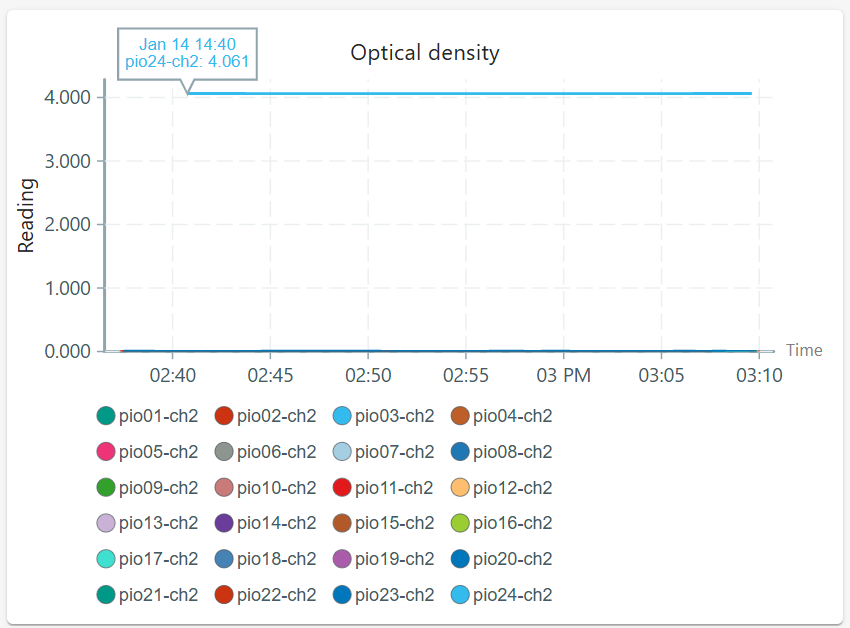
It seems like I am still getting this issue. My pioreactors are filled with water, but one of them supposedly has an OD of 4.061, which is exactly the maximum of my OD calibration. I have noticed this a few times previously. (Currently running the latest version v24.12.10.)

I have had a few errors like this one, which confuse me. The error says that the signal is outside the calibration range, but the observed voltage is actually withing the calibration range. Note that these errors also occur for a few pioreactors that do not map to the maximum signal.

Signal outside suggested calibration range. Trimming signal. Calibrated for OD=[0, 4.06], V=[0, 0.546]. Observed 0.002V.

Do you have idea how to solve this?

@mandy-twig for this pioreactor, can you send me the calibration data? Ex:

  1. SSH into that worker, run
     pio run od_calibration display
    
  2. Copy the JSON blob at the end (The bits between the { and }).

While you’re there, can you confirm the version is 24.12.10 as well:

pio version

I’m going to try to reproduce the error here.

Data for od-cal-2024-12-02-M9

{
“type”: “od_90”,
“created_at”: “2024-12-05T15:27:38.333562Z”,
“pioreactor_unit”: “pio24”,
“name”: “od-cal-2024-12-02-M9”,
“angle”: “90”,
“maximum_od600”: 4.061,
“minimum_od600”: 0.0,
“minimum_voltage”: 0.0,
“maximum_voltage”: 0.5463,
“curve_type”: “poly”,
“curve_data_”: [
-0.03112259838616315,
0.14606367297714123,
0.05224678328234911,
0.009665339167023364
],
“voltages”: [
0.0,
0.0158,
0.0322,
0.0589,
0.1002,
0.1648,
0.4045,
0.5463
],
“od600s”: [
0.0,
0.139,
0.155,
0.378,
0.671,
0.993,
1.82,
4.061
],
“ir_led_intensity”: 50.0,
“pd_channel”: “2”
}

pioreactor@pio24:~ $ pio version
24.12.10

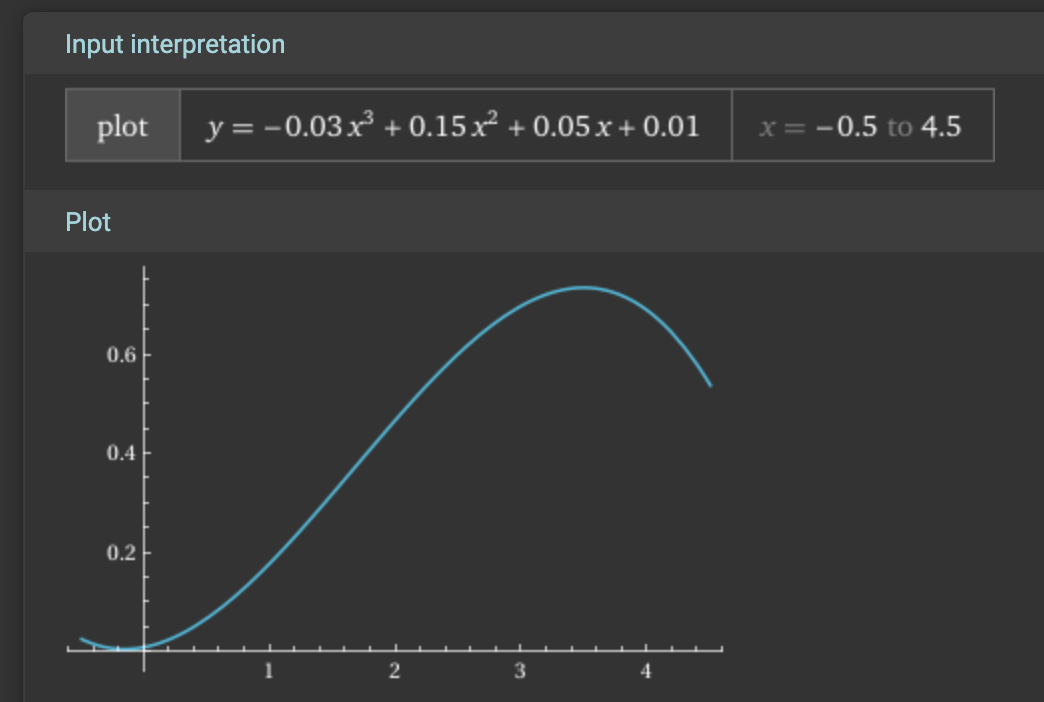
Thanks @mandy-twig, I know what’s going on. It’s a consequence of how calibrations are “fit”. The polynomial fitted to the dataset, y=-0.03x³ + 0.15x² + 0.05x + 0.01, looks like:

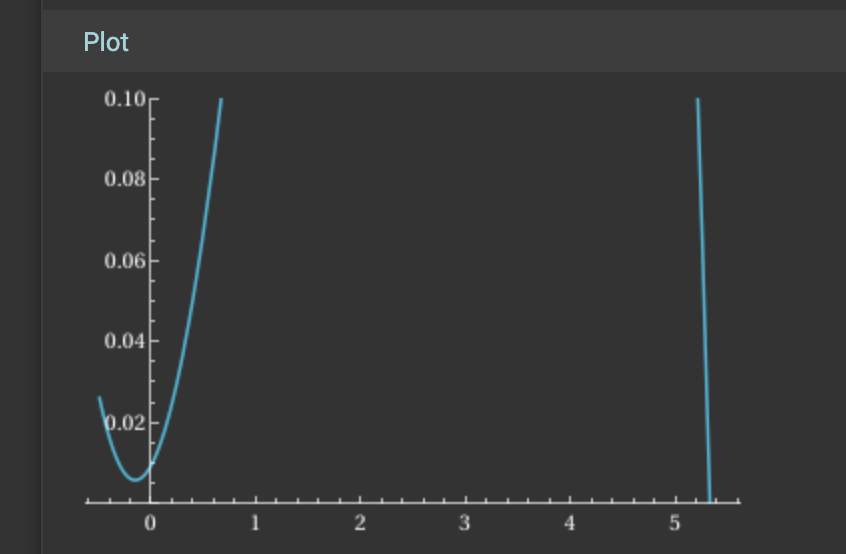
but if I zoom in on the x-axis,

So when we do the inference in the code, we are solving 0.002 = -0.03x³ + 0.15x² + 0.05x + 0.01, which is the same as drawing a horizontal line at 0.002 and seeing where it intersects the curve. As you can see, the only (positive) intersection occurs x~=5.5, and that’s why you see a large value + warning in the Pioreactor (truncated to 4.061).


Our fitted polynomial is silly: your inputted data has the point (0,0), so our fitted curve should have the property that f(0) ~= 0. We can make some tweaks to the fitting algorithm to bias this.

Let me think more a solution for you now, and how we can generally avoid this in the future.

So I think the bug is in our polyfit, where we have a bias that weighs the regression towards the largest value, where it should in fact be the smallest value (the blank). This generally isn’t an issue, compare these two calibration curves before (old) and after (new) the bug fix:

however the error you are seeing above can creep up: notice the slight difference in the curves near x=0 - that’s the problem!

Problem is diagnosed, next is to solve it for existing calibrations!

Hi @CamDavidsonPilon,

Hope all is well with you.

We are still experiencing this issue where if the voltage is above the calibration range for OD, it maps to the min OD and if the votage is below the calibration range for OD, it maps to the max OD. This is pretty unintuitive. We think it would be more intuitive to map to the maximum OD if it’s above the maximum voltage, and to the minimum OD if it’s the minimum voltage.

We were using this calibration file:

calibration_type: od600
calibration_name: M5_YE_sept
calibrated_on_pioreactor_unit: pio01
created_at: 2025-09-23T14:34:58.629000Z
curve_data_:
  - -0.003190387455580229
  - 0.04003007669797895
  - 0.05183324889904352
  - 0.3399254157439484
x: OD600
y: Voltage
recorded_data:
  x:
    - 0
    - 0.361
    - 0.657
    - 1.32
    - 2.58
    - 3.3
    - 4.36
    - 5.74
    - 6.98
    - 7.89
    - 9.47
  y:
    - 0.5466
    - 0.3466
    - 0.5757
    - 0.6696
    - 0.5935
    - 0.9594
    - 0.9591
    - 1.2046
    - 1.74
    - 1.6743
    - 1.6807
curve_type: poly
ir_led_intensity: 50
angle: '45'
pd_channel: '1'

This is the error we got:

“Signal below suggested calibration range. Trimming signal. Calibrated for OD=[0, 9.47], V=[0.347, 1.74]. Observed 2.903V, which would map outside the allowed values.”

And the calibrated OD value returned was 0:

I asked chatGPT to try to reproduce the problem using one of our real calibrations and a real OD value. od_reading_exploration.py (4.4 KB)

chatGPT’s suggestion is amending:

except exc.SolutionBelowDomainError:
    if not self.has_logged_warning:
        self.logger.warning(
            f"Signal below suggested calibration range. Trimming signal. Calibrated for OD=[{min_OD:0.3g}, {max_OD:0.3g}], V=[{min_voltage:0.3g}, {max_voltage:0.3g}]. Observed {observed_voltage:0.3f}V, which would map outside the allowed values."
        )
    self.has_logged_warning = True
    return min_OD

to:

except exc.SolutionBelowDomainError:
    # If the raw voltage is *above* the calibrated voltage range,
    # this exception can still occur, but we should trim to max_OD.
    if observed_voltage > max_voltage:
        if not self.has_logged_warning:
            self.logger.warning(
                f"Signal above suggested calibration range. Trimming signal. "
                f"Calibrated for OD=[{min_OD:0.3g}, {max_OD:0.3g}], "
                f"V=[{min_voltage:0.3g}, {max_voltage:0.3g}]. "
                f"Observed {observed_voltage:0.3f}V."
            )
        self.has_logged_warning = True
        return max_OD

    # Otherwise this is a true below-range voltage
    if not self.has_logged_warning:
        self.logger.warning(
            f"Signal below suggested calibration range. Trimming signal. "
            f"Calibrated for OD=[{min_OD:0.3g}, {max_OD:0.3g}], "
            f"V=[{min_voltage:0.3g}, {max_voltage:0.3g}]. "
            f"Observed {observed_voltage:0.3f}V."
        )
    self.has_logged_warning = True
    return min_OD

What do you think?

Many thanks,

Vicky
And the equivalent for above domain error:

 except exc.SolutionAboveDomainError:
        # The polynomial inverse says "OD is above domain".
        # Again, decide based on the *voltage*:
        if observed_voltage < min_voltage:
            # Very low voltage → clip to min OD  (if you prefer low V → max_OD, swap min_OD/max_OD here)
            if not self.has_logged_warning:
                self.logger.warning(
                    f"Signal below suggested calibration range. Trimming signal. "
                    f"Calibrated for OD=[{min_OD:0.3g}, {max_OD:0.3g}], "
                    f"V=[{min_voltage:0.3g}, {max_voltage:0.3g}]. "
                    f"Observed {observed_voltage:0.3f}V."
                )
            self.has_logged_warning = True
            return min_OD
        else:
            # Truly above-range voltage → clip to max OD
            if not self.has_logged_warning:
                self.logger.warning(
                    f"Signal above suggested calibration range. Trimming signal. "
                    f"Calibrated for OD=[{min_OD:0.3g}, {max_OD:0.3g}], "
                    f"V=[{min_voltage:0.3g}, {max_voltage:0.3g}]. "
                    f"Observed {observed_voltage:0.3f}V."
                )
            self.has_logged_warning = True
            return max_OD

Hi @vickylouise,

Yup, there is a bug here. Your script helps, too. The root problems are 1) non-monotonic polynomials, 2) not catching errors correctly. I’ve made the change, and will get it out for the next release.

The relevant changes are here. If you don’t want to wait / update, you can edit the od_reading code directly on the raspberry pi, at /usr/local/lib/python3.11/dist-packages/pioreactor/background_jobs/od_reading.py, or add a modified od_reading.py python file to ~/.pioreactor/plugins.


Here’s what the new code vs old would produce:

  voltage      old output   new output
  0.100000     9.47         0.361
  0.346600     0.1181       0.1181
  0.350000     0.1719       0.1719
  0.600000     2.1238       2.1238
  1.000000     4.0751       4.0751
  1.500000     6.5483       6.5483
  1.740000     0            6.98
  2.000000     0            6.98
  2.902652392  0            6.98

Fantastic, thanks so much @CamDavidsonPilon !